 Hogwarts
Vue.js Starter - Component
Vue.js 프로젝트 투입 일주일 전 - Part 4
13. Nested Component - Props 👩💻
1. Parent/Child Component and Props
- Parent Component
1 )
Component Tags는PascalCase를 사용한다.<template> <MyComponent /> </template> <script> import MyComponent from "@/components/MyComponent.vue"; export default { components: { MyComponent } } </script>2 ) 자식 컴포넌트에 전달할
Props는 HTML attributes 와 convention 을 맞추기 위해kebab-case를 사용하며, 키의 중복을 막기 위해 이름을 축약 없이 길게 선언한다.<template> <MyComponent greeting-message="hello" /> </template>3 )
Dynamic Props를 전달하기 위해v-bind또는:를 사용한다.<template> <MyComponent :greeting-message="post.title" /> </template>
- Child Component
1 ) 부모 컴포넌트가 전달한 데이터는
propsproperty 에Object를 매핑해 받는다. 이때 이름은 JavaScript 의 식별자 규칙에 맞게camelCase를 사용한다.<script> export default { props: { greetingMessage: String } } </script>2 )
props는TypeScript를 사용하지 않고도 부모에게 전달 받은Data Type을 지정할 수 있게 도와준다. 자세한 Type 체크 및 Validation 은 5. Prop Validation 를 참고한다.
2. Static Props
Child Component PageTitle를 만든다.
- /src/components/PageTitle.vue
<template>
  <h2>{{ myTitle }}</h2>
</template>

<script>
export default {
  name: "PageTitle",
  props: {
    myTitle: { type: String, default: "페이지 제목입니다." },
  },
};
</script>
PageTitle 컴포넌트를 부모 컴포넌트에 주입시키고, Static Props로 데이터를 전달해보자.
- /src/views/AboutView.vue
<template>
  <PageTitle my-title="About 페이지입니다." />
</template>

<script>
import PageTitle from "@/components/PageTitle.vue";

export default {
  name: "AboutView",
  components: {
    PageTitle,
  },
};
</script>

3. Dynamic Props
Value 자체를 전달하는 것이 아닌 변수/상수를 전달하려면 v-bind 또는 축약형인 :를 사용한다.
- /src/views/AboutView.vue
<template>
  <PageTitle :my-title="someTitle" />
</template>

<script>
import PageTitle from "@/components/PageTitle.vue";

export default {
  name: "AboutView",
  components: {
    PageTitle,
  },
  data() {
    return {
      someTitle: "About 페이지입니다.",
    };
  },
};
</script>
자식 컴포넌트는 부모 컴포넌트에서 전달하는 데이터가
Static Props인지,Dynamic Props인지 알 수 없다. 단지 전달 받을 타입만 정의하고 그 값(Value Types or Reference Types)을 받을 뿐이다.
별도의 변수 없이 전달하려면 다음과 같이 IIFE를 사용할 수 있다.
<template>
  <PageTitle :my-title="(() => 'About 페이지입니다.')()" />
</template>
Static Props는String만 전달할 수 있다. 따라서 Number, Boolean, Array, Object, Property of Object와 같은 데이터는 모두Dynamic Props를 사용해 전달해야한다.
4. One-way Data Flow
Vue 자체는 Two-way data binding를 지원하지만, 부모 자식 컴포넌트 사이는 One-way down binding으로 작동한다.
이는 자식 컴포넌트에 의해 부모 컴포넌트의 state가 변경되는 것을 허용하게 되면 앱의 데이터 흐름을 이해하기
어렵게 만들기 때문이다.
Vue에 의해Two-way data binding이 안 된다는 것 뿐이지 자식 컴포넌트에서 부모 컴포넌트로 데이터 전달이 불가능한 것은 아니다.Vue에 의해binding이 되지 않고, 자식 컴포넌트가 부모 컴포넌트를 변경할 수 없기 때문에 부모 컴포넌트 쪽에서 능동적으로 데이터를 반영하는 방법을 사용할 수 있다.
- 자식 컴포넌트가 부모 컴포넌트의 함수에 데이터를 arguments 로 던져 올리고, 부모 컴포넌트의 함수가 이 데이터를 자신의 변수에 저장한다. See: Emitting and Listening to Events
- 다른 방법으로는 부모 컴포넌트가 자식 컴포넌트의 데이터를
Template Refs를 이용해 변화를 감시하도록 부모 컴포넌트 내에Computed Properties를 선언하고, 변화를 감시할 값을Template Refs를 이용해 자식 컴포넌트의 변수를 지정한다. See:
1 ) Make Props like Local Variable
즉, 부모 컴포넌트에서 전달된 자식 컴포넌트는 down binding 상태이므로 부모의 상태가 변하면 값이 변하게 된다.
따라서, 자식 컴포넌트에서 이를 local variable처럼 사용하기를 원한다면 다음과 같이 별도의 변수에 값을 저장해
사용한다.
<script>
export default {
  props: ['initialCounter'],
  data() {
    return {
      // counter only uses this.initialCounter as the initial value;
      // it is disconnected from future prop updates.
      counter: this.initialCounter
    }
  }
}
</script>
2 ) Props with Computed Properties
변수에 값을 저장할 때 Observer를 이용해 감시하고, 사용자 정의 로직을 추가해 저장할 수 있다.
하지만, Vue의 Watch의 경우 부모 컴포넌트에서 넘어오는 데이터를 자식 컴포넌트 변수에 willSet이 없고
didSet만 있다보니(Vue Watch Property) Vue 공식 문서를 보면 이런 경우 Compouted Properties를
사용하도록 하고 있다.
<script>
export default {
  props: ['size'],
  computed: {
    // computed property that auto-updates when the prop changes
    normalizedSize() {
      return this.size.trim().toLowerCase()
    }
  }
}
</script>
5. Prop Validation
단순히 값을 전달하는 것 외에 다음과 같이 유효성 검사를 추가할 수 있다.
export default {
  props: {
    // Basic type check
    //  (`null` and `undefined` values will allow any type)
    propA: Number,
    // Multiple possible types
    propB: [String, Number],
    // Required string
    propC: {
      type: String,
      required: true
    },
    // Number with a default value
    propD: {
      type: Number,
      default: 100
    },
    // Object with a default value
    propE: {
      type: Object,
      // Object or array defaults must be returned from
      // a factory function. The function receives the raw
      // props received by the component as the argument.
      default(rawProps) {
        return { message: 'hello' }
      }
    },
    // Custom validator function
    propF: {
      validator(value) {
        // The value must match one of these strings
        return ['success', 'warning', 'danger'].includes(value)
      }
    },
    // Function with a default value
    propG: {
      type: Function,
      // Unlike object or array default, this is not a factory function - this is a function to serve as a default value
      default() {
        return 'Default function'
      }
    }
  }
}
14. Nested Component - Template Refs and Event Call 👩💻
1. Template Refs ($ref) (Parent to Child)
HTML에서 id attribute 가 unique한 속성을 가진 것처럼, Vue에서는 ref attribute 가 이 역할을 한다.
따라서, Vue에서 어떤 컴포넌트 또는 Real DOM에 접근하고 싶다면 ref를 사용해 접근할 수 있다.
Vue에서 Real DOM에 접근하고 이를 다루는 것이 좋은 방법은 아니지만, ref를 이용하면 부모 컴포넌트가 자식 컴포넌트의
DOM 에 접근해 click 이벤트를 호출하거나, 자식 컴포넌트 내에 정의된 함수를 호출하거나, 자식 컴포넌트 내에 정의된 변수에 접근하는
것과 같은 모든 행위가 가능하다(window.opener로 접근할 때의 부모 자식 창 관계와 유사하다).
2. Emitting and Listening to Events ($emit) (Child to Parent)
반면, 자식 컴포넌트에서 부모 컴포넌트에 무언가 직접적으로 데이터를 전달할 수 있는 방법은 부모 컴포넌트에 정의되어 있으며, 자식 컴포넌트에
binding 된 함수를 호출하기 위해 emitting하는 것만 허용된다. 하자민 정확히 얘기하면, 부모 컴포넌트가 자식 컴포넌트에 제공한 함수가
호출 요청이 있는지 listening하고 있고, 자식 컴포넌트에서 부모 컴포넌트에서 제공된 함수를 호출하는 요청과 함깨 arguments를
전달해 올리는 emitting이 발생됨으로 인해 자식 컴포넌트에서 부모 컴포넌트의 함수를 호출하는 것처럼 보이는 것일 뿐이다.
Props와 마찬가지로, Parent Component에서 Component Tags에 attribute 형태로 등록되는v-bind는 모두kebab-case를 사용하고,Child Componenet에서 이것을 binding 할 변수는 모두camelCase를 사용한다.
3. Computed Properties (Child to Parent)
Computed Properties의 타겟이 자기 자신의 컴포넌트의 데이터일 경우Two-way binding도 되고 아무런 제약이 없던 것과 달리 타겟을Template Refs를 이용해 자식 컴포넌트의 값을 감시할 경우, 이 변수는 부모 컴포넌트의script내에서만 사용이 가능하다.
(template에 사용된 변수는Two-way data binding으로 작동하는데, 이때template의 변경 내역이script에 정의된Computed Property로 전달 되고, 이는 다시 타겟인 자식 컴포넌트의 데이터를 향하게 된다. 문제는 자식 컴포넌트의 변경 사항은 부모 컴포넌트에서 능동적으로 제어되는 것일 뿐, 자식 컴포넌트에서 부모 컴포넌트로 전달을 하지 못 하므로Two-way data binding의 흐름이 끊어진다.)
4. Template Refs and Event Call Examples
- /src/views/EventCallView.vue
<template>
  <h1>Parent Component</h1>
  <button type="button" @click="parentFunc">
    부모 컴포넌트에서 부모 컴포넌트 이벤트 호출
  </button>
  <button type="button" @click="callChildEvent">
    부모 컴포넌트에서 자식 컴포넌트 이벤트 호출(Real DOM 에 접근)
  </button>
  <button type="button" @click="callChildFunc">
    부모 컴포넌트에서 자식 컴포넌트 이벤트 호출(함수에 직접 접근)
  </button>
  <button type="button" @click="setChildVariable">
    부모 컴포넌트에서 자식 컴포넌트 데이터 'alpha' 변경
  </button>
  <!--  <p>-->
  <!--    자식 컴포넌트의 데이터를 'beta' 를 computed 하는 부모 컴포넌트의 데이터:-->
  <!--    {{ syncedWithChildComponentVariable }}-->
  <!--  </p>-->
  <button type="button" @click="popSyncedVariable">
    자식 컴포넌트의 데이터 'beta' 를 computed 하는 부모 컴포넌트의 데이터 팝업
  </button>
  <hr />
  <ChildComponent @parent-Func="parentFunc" ref="childComponent" />
</template>

<script>
import ChildComponent from "@/components/ChildComponent.vue";

export default {
  name: "EventCallView",
  components: {
    ChildComponent,
  },
  methods: {
    parentFunc() {
      alert("부모 컴포넌트 이벤트가 호출되었습니다.");
    },
    callChildEvent() {
      this.$refs.childComponent.$refs.myChildButton.click();
    },
    callChildFunc() {
      this.$refs.childComponent.childFunc();
    },
    setChildVariable() {
      this.$refs.childComponent.alpha = Math.trunc(Math.random() * 10);
    },
    popSyncedVariable() {
      alert(this.syncedWithChildComponentVariable);
    },
  },
  computed: {
    syncedWithChildComponentVariable() {
      return this.$refs.childComponent.beta;
    },
  },
};
</script>
- /src/components/ChildComponent.vue
<template>
  <h1>Child Component</h1>
  <button type="button" @click="childFunc" ref="myChildButton">
    자식 컴포넌트에서 자식 컴포넌트 이벤트 호출
  </button>
  <button type="button" @click="callParentFunc">
    자식 컴포넌트에서 부모 컴포넌트 이벤트 호출
  </button>
  <button type="button" @click="setSelfVariable">
    자식 컴포넌트에서 자식 컴포넌트 데이터 'beta' 변경
  </button>
  <p>alpha: {{ alpha }}</p>
  <p>beta: {{ beta }}</p>
</template>

<script>
export default {
  name: "ChildComponent",
  data() {
    return {
      alpha: 0,
      beta: 0,
      gamma: "abc",
    };
  },
  methods: {
    childFunc() {
      alert("자식 컴포넌트의 이벤트가 호출되었습니다.");
    },
    callParentFunc() {
      this.$emit("parentFunc");
    },
    setSelfVariable() {
      this.beta = Math.trunc(Math.random() * 10);
    },
  },
};
</script>
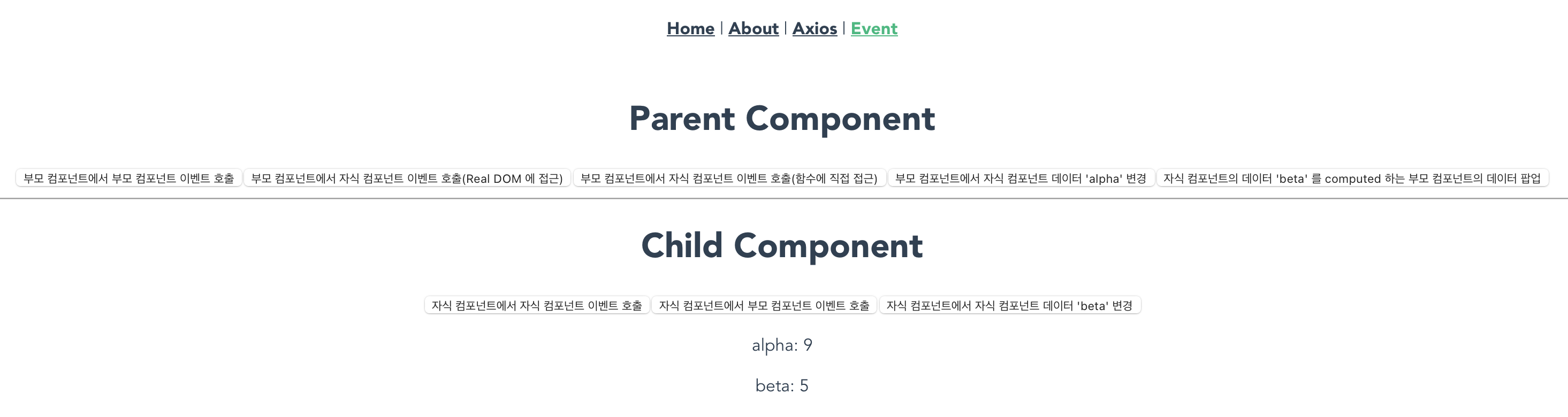
15. Nested Component - Slots 👩💻
1. Slot Content and Outlet
일관된 디자인은 UI/UX에 매우 중요하다. 팝업창을 예로 들면, 동일한 팝업이라도 개발자가 매번 직접 구현할 경우
실수든 서로 다른 개발자에 의해 개발자의 주관이 섞이게 되든 다른 부분이 나타나게 된다.
공통화 및 재사용을 위해 Vue 는 Componenets를 이용한다. 하지만 단순한 모달창, 타이틀과 같은 컴포넌트는
부모 자식간 props를 이용해 데이터를 전달하고 전부 구현해야하는 불편함이 있다. 이런 공통 컴포넌트 내에 Slots을 이용하면
HTML을 작성해 그대로 주입하는 것이 가능해 가벼운 레이아웃을 쉽게 재사용 할 수 있다.
- /src/components/PageTitle.vue
2. Static Props 에서 /src/components/PageTitle.vue 를 이용해 페이지에 타이틀을 공통화했다.
<template>
  <h2>{{ myTitle }}</h2>
</template>

<script>
export default {
  name: "PageTitle",
  props: {
    myTitle: { type: String, default: "페이지 제목입니다." },
  },
};
</script>
- /src/components/common/SlotPageTitle.vue
이것을 Slot으로 바꾸면 다음과 같다.
<template>
  <h2><slot /></h2>
</template>

<script>
export default {
  name: "SlotPageTitle",
};
</script>
부모 컴포넌트 역시 단순 컴포넌트를 재사용 할 때와 Slot을 사용한 컴포넌트를 재사용 할 때 코드는 다음과 같이
변경된다.
- /src/views/AboutView.vue (with Ordinary Component)
<template>
  <PageTitle my-title="About 페이지입니다." />
</template>

<script>
import PageTitle from "@/components/PageTitle.vue";

export default {
  name: "AboutView",
  components: {
    PageTitle,
  },
};
</script>
- /src/views/AboutView.vue (with Slot Component)
<template>
  <SlotPageTitle> About 페이지입니다. </SlotPageTitle>
</template>

<script>
import SlotPageTitle from "@/components/common/SlotPageTitle.vue";

export default {
  name: "AboutView",
  components: {
    SlotPageTitle,
  },
};
</script>
2. Named Slots
단일 Slot 이 아닌 경우 구분하기 위해 'name' 이 필요하다. 각 name 은 element 를 이용해 삽입하고,
v-slot attribute 를 이용해 연결할 수 있다.
여러 Slots 중 하나의 Slot 에 한해 name 을 생략할 수 있는데, 이 경우 v-slot:default을 이용해 연결한다.
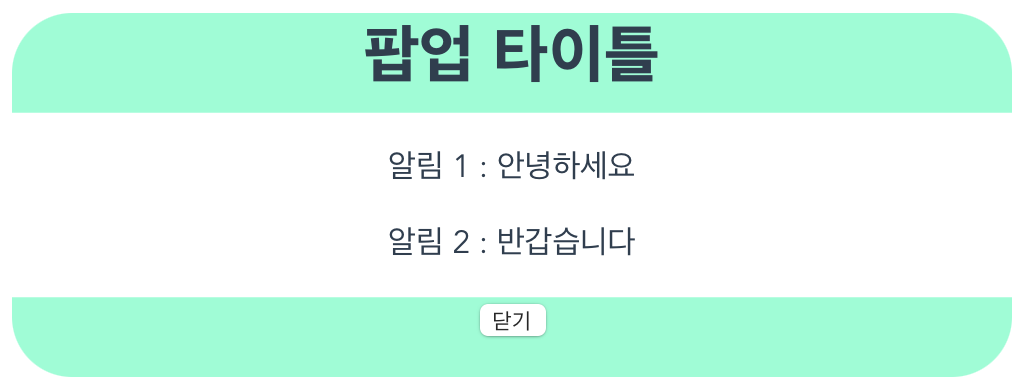
header, main, footer 로 구성된 팝업 모달 레이아웃을 Slot으로 만들어 적용해보자.
- /src/components/common/SlotModalLayout.vue
<template>
  <div class="modal-container">
    <header>
      <h1>
        <slot name="header"></slot>
      </h1>
    </header>
    <main>
      <slot></slot>
    </main>
    <footer>
      <slot name="footer"></slot>
    </footer>
  </div>
</template>

<script>
export default {
  name: "SlotModalLayout",
};
</script>

<style scoped>
.modal-container {
  width: 500px;
  --modal-border: 30px;
}

.modal-container > header {
  height: 50px;
  background: aquamarine;
  border-top-left-radius: var(--modal-border);
  border-top-right-radius: var(--modal-border);
}

.modal-container > main {
}

.modal-container > footer {
  height: 40px;
  background: aquamarine;
  border-bottom-left-radius: var(--modal-border);
  border-bottom-right-radius: var(--modal-border);
}
</style>
- /src/views/SlotModalLayoutView.vue
<template>
  <button type="button" @click="openPopup">
    {{ popupState ? "Close Popup" : "Open Popup!!" }}
  </button>

  <hr />

  <SlotModalLayout v-show="popupState === true">
    <template v-slot:header> 팝업 타이틀 </template>
    <template v-slot:default>
      <p>알림 1 : 안녕하세요</p>
      <p>알림 2 : 반갑습니다</p>
    </template>
    <template v-slot:footer>
      <button type="button" @click="openPopup">닫기</button>
    </template>
  </SlotModalLayout>
</template>

<script>
import SlotModalLayout from "@/components/common/SlotModalLayout.vue";

export default {
  name: "SlotModalLayoutView",
  data() {
    return {
      popupState: false,
    };
  },
  components: {
    SlotModalLayout,
  },
  methods: {
    openPopup() {
      this.popupState = !this.popupState;
    },
  },
};
</script>
그리고 v-slot:은 #을 이용해 단축형으로 작성할 수 있다.
<template>
  <button type="button" @click="openPopup">
    {{ popupState ? "Close Popup" : "Open Popup!!" }}
  </button>

  <hr />

  <SlotModalLayout v-show="popupState === true">
    <template #header> 팝업 타이틀 </template>
    <template #default>
      <p>알림 1 : 안녕하세요</p>
      <p>알림 2 : 반갑습니다</p>
    </template>
    <template #footer>
      <button type="button" @click="openPopup">닫기</button>
    </template>
  </SlotModalLayout>
</template>
3. Slot Examples
1. Slot Content and Outlet, 2. Named Slots 에 추가로
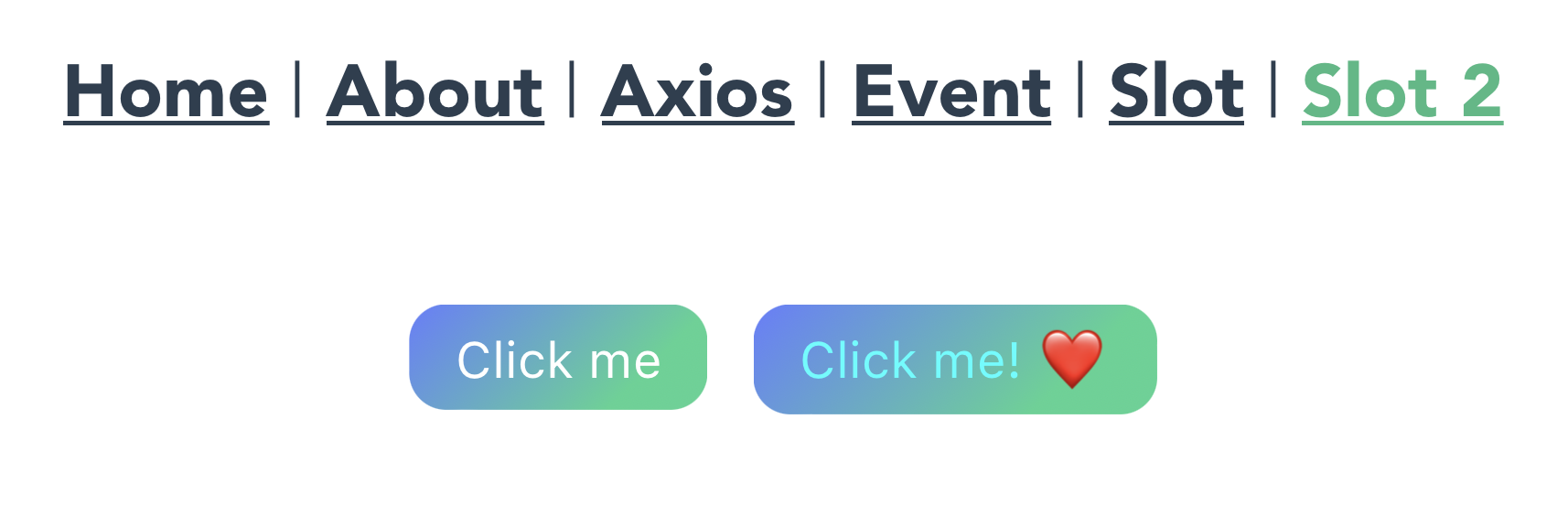
버튼 스타일을 공통화 하는 Vue.js documents 예제를 하나 더 소개한다.
- /src/components/common/FancyButton.vue
<template>
  <button class="fancy-btn">
    <slot />
  </button>
</template>

<style scoped>
.fancy-btn {
  color: #fff;
  background: linear-gradient(315deg, #42d392 25%, #647eff);
  border: none;
  padding: 5px 10px;
  margin: 5px;
  border-radius: 8px;
  cursor: pointer;
}
</style>
- /src/components/common/AwesomeIcon.vue
<!-- using an emoji just for demo purposes -->
<template>❤️</template>
- /src/views/FancyButtonView.vue
<template>
  <FancyButton> Click me </FancyButton>

  <FancyButton>
    <span style="color: cyan">Click me! </span>
    <AwesomeIcon />
  </FancyButton>
</template>

<script>
import FancyButton from "@/components/common/FancyButton.vue";
import AwesomeIcon from "@/components/common/AwesomeIcon.vue";

export default {
  name: "FancyButtonView",
  components: {
    FancyButton,
    AwesomeIcon,
  },
};
</script>
16. Nested Component - Provide/Inject 👩💻
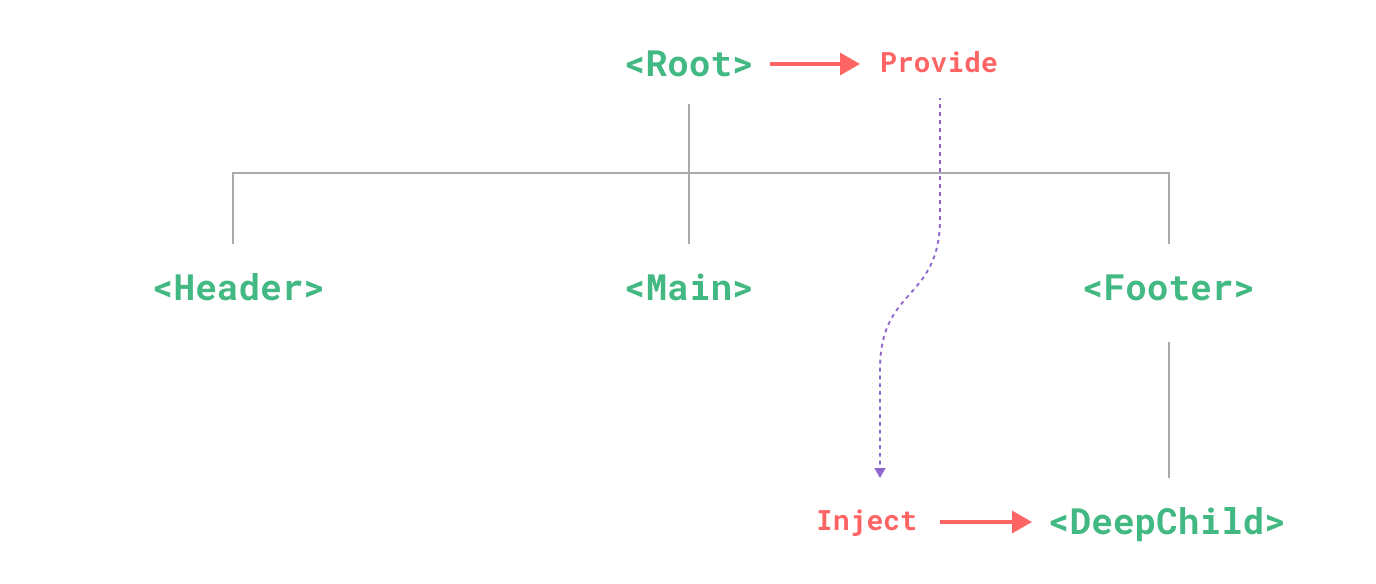
Props를 사용하면 부모 컴포넌트에서 자식 컴포넌트로 데이터를 전달할 수 있다. 문제는 계층이 1 계층이 아닌 경우
부모에서 자식에게, 또 다시 부모에서 자식에게… 이런식으로 여러 차례 반복해 내려가야 한다는 문제가 있다.
따라서 이런 경우
Provide로 제공하고,Inject로 주입하면 여러 계층으로 구성된 large tree 컴포넌트에서도DeepChild까지 한 번에 주입이 가능케 한다Prop Drilling.단,
Provide를 통해 제공된 데이터는 자식 컴포넌트에서 주입할 때 어떤 상위 컴포넌트에서 온 데이터인지 알 수 없다는 단점이 존재한다.
1. Provide
- /src/views/RootView.vue
<template>
  <FirstChild />
</template>

<script>
import FirstChild from "@/components/FirstChild.vue";

export default {
  name: "RootView",
  components: {
    FirstChild,
  },
  provide() {
    return {
      rootValue: "Hello~ I'm root.",
    };
  },
};
</script>
- /src/components/FirstChild.vue
<template>
  <SecondChild />
</template>

<script>
import SecondChild from "@/components/SecondChild.vue";

export default {
  name: "FirstChild",
  components: {
    SecondChild,
  },
};
</script>
- /src/components/SecondChild.vue
<template>
  <ThirdChild />
</template>

<script>
import ThirdChild from "@/components/ThirdChild.vue";

export default {
  name: "SecondChild",
  components: {
    ThirdChild,
  },
};
</script>
2. App-level Provide
Provide를 App-level에서 제공하면 모든 컴포넌트에서 사용할 수 있다. 일반적으로 플러그인은 컴포넌트를 이용해 값을 제공할 수
없기 때문에 플러그인을 앱 전역에 작성할 때 유용하다.
- /src/main.js
import { createApp } from "vue";
import App from "./App.vue";
import router from "./router";
import store from "./store";
import mixins from "@/mixins";

createApp(App)
  .use(store)
  .use(router)
  .mixin(mixins)
  .provide("appLevelValue", "Hello~ This is App")
  .mount("#app");
3. Inject
- /src/components/ThirdChild.vue
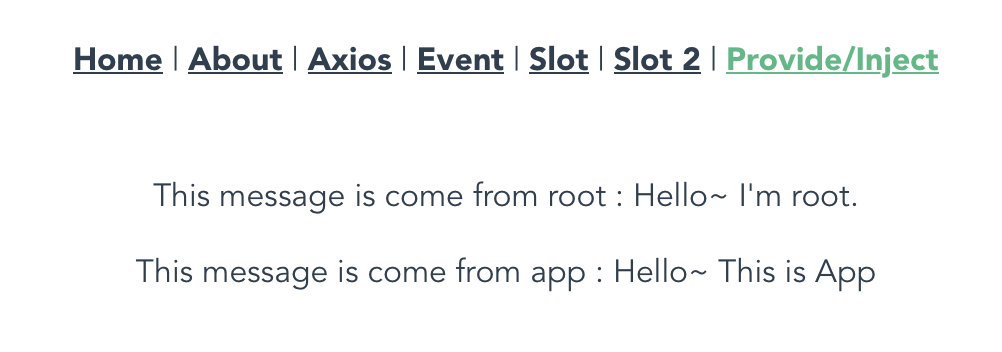
Provide 된 데이터를 컴포넌트에 주입하는 방법은 Array를 이용하는 것과 Object를 이용하는 것 두 가지가 있다.
Array를 이용해 단순 주입하기
<template>
  <p>This message is come from root : {{ rootValue }}</p>
  <p>This message is come from app : {{ appLevelValue }}</p>
</template>

<script>
export default {
  name: "ThirdChild",
  inject: ["rootValue", "appLevelValue"],
};
</script>
Object를 이용해key-value타입으로 주입하기
<template>
  <p>This message is come from root : {{ rootMessage }}</p>
  <p>This message is come from app : {{ appMessage }}</p>
</template>

<script>
export default {
  name: "ThirdChild",
  inject: {
    rootMessage: "rootValue",
    appMessage: "appLevelValue",
  },
};
</script>
Object를 이용해key-value타입으로 주입하면, 상위 컴포넌트에서 제공한Provide의 변수명 대신 자식 컴포넌트에서 생성한 변수명을 사용하는 것이 가능하다.
Reference
- 고승원. Vue.js 프로젝트 투입 일주일 전. 비제이퍼블릭 Chapter 8, 2021.